01
Plan your whole week.
See your training sessions and tournaments across clubs in one calendar. Search events and filter by club, type and period. Choose the calendar time zone that works for you.

RAQETO · Coaches
Your coaching calendar, invitations, guest places and attendance in one workspace. Organise individual, paired and group sessions across available clubs, with a history of your own students.
Coach access is assigned by a platform administrator. You do not need to own a club.
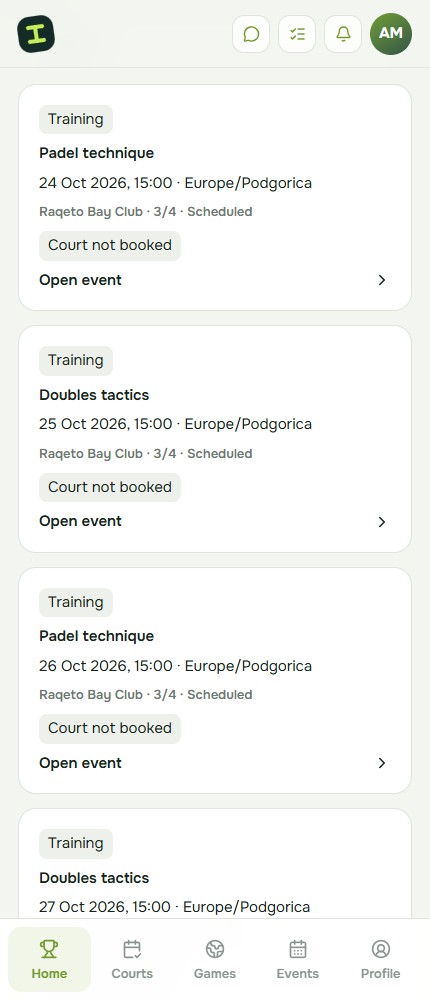
See your training sessions and tournaments across clubs in one calendar. Search events and filter by club, type and period. Choose the calendar time zone that works for you.
Select registered students and send several invitations together. Or share a session link and QR code: recipients can sign in and confirm while places remain.
Reserve a place for a guest and record their attendance. Later, send a personal link so they can sign in and link the existing place to their account without taking a second place.
Set the format, place, time, capacity and participation fee, including whether the court is included. Book the court separately and follow its status. Creating a session does not reserve the court.
Mark attendance and absences, and see your own students’ event history. The attention list highlights incomplete groups, pending invitations, booking problems and sessions still awaiting attendance.
Coach access also lets you organise your own tournament at a published club, configure its format, register participants and manage results. Court reservations follow the club’s rules.
RAQETO
Request coach access and choose an available club.
Set the time, format, places and participation conditions.
Invite students, add guests and book the court.
Record attendance and complete the session.
RAQETO
No. The coach role is enough to use your workspace. It does not give you access to another club’s CRM, finances or client database.
No. Book the court separately and check its status and the club’s conditions before the session.
Not in the coach workspace. The participation fee describes the session conditions; payment is arranged separately.
With a separate administrator permission, a coach can confirm or adjust their own students’ padel rating. This permission is not included automatically.